

.png)
Cook Easy
UX Case Study: an inventory-based recipe suggestion app for smartphone users
Role: UX Design & Research
Teammates: Prachi Modi, Sree Teja, Supreeya Karn
Project Duration: August 2022 to December 2022
Developed for the MSIS course in Information Architecture & Design
Cook Easy is a lifestyle application for smartphone users to assist them with quick/easy home-cook recipes and offers active pantry management. The product features recipe recommendations based on matching available ingredients in the pantry with users' culinary preferences and dietary restrictions and offers video and text tutorials to assist them in the preparation.


User Research >> Information Research >> Ideation >> Prototyping
01. User Research
As a project in Information Design & Architecture, the project sought to combine user, content, and context. The user research portion was aimed at understanding the former area, i.e., users. We defined the prospective user base, framed research questions, and developed question verbatims to conduct user interviews. This was followed by synthesizing the data gained out of interviews to make data points, that were analyzed through artifacts such as user personas, affinity mapping, and user journey maps.
1.1 Target Users
The app is primarily meant for students and proactive people with less time in hand. The demographic was not limited by age, gender, or household size. 11 participants, who were screened based on the criteria that they cook and manage their own kitchen, were interviewed about pain points and hurdles surrounding shopping, planning, cooking, and kitchen waste mitigation.
1.2 User Interviews & Takeaways
We approached the interview process by coming up with research questions that need answering to address design decisions. We framed question verbatims in a way to answers these research questions. Interviews consisted of 15-20 questions revolving around the areas given below (research questions associated with the verbatims are mentioned in parentheses):
-
What is your current living arrangement? (to understand cooking behavior, no. of people they cook for, who buys pantries, etc.)
-
What factors decide your meal plans? (to understand diet plans, planning strategies, prep time, cooking expertise, etc.)
-
What’s your most preferred method of learning a recipe? (to understand learning behavior, type of text or video preferred, etc.)
-
What factors decide your shopping list? (to understand buying behavior, whether they plan and buy ahead or buy as they run out of items or buy specific items based on what they plan on cooking, etc.)
-
What are some things that you hate about managing your kitchen? (to understand the cognitive tasks that bother users in the management of their pantry and during cooking)
On framing these questions, we came to realize how pantry management, shopping behavior, and the cooking pattern is interlinked with each other beyond our initial expectations, thus opening our mindset to a greater opportunity in the scope of the product.
A sample of data points collected from the participants is shown below.
.png)
They were further grouped under common trends found in the data as shown below.
.png)
1.3 User Persona
Two user personas where formed to take into consideration the requirements of the wide variety of user goals and needs identified form the user interviews of 11 participants.
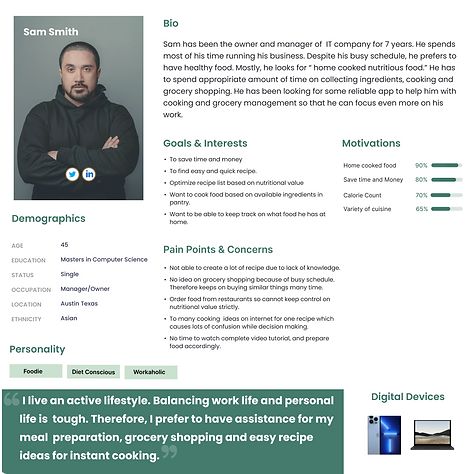
Participant 1: Professional, lives with family
Sam has been the owner and manager of an IT company for 7 years. He spends most of his time running his business. Despite his busy schedule, he prefers to have healthy food. Mostly, he looks for “home-cooked nutritious food.” He has to spend an appropriate amount of time collecting ingredients, cooking, and grocery shopping. He has been looking for a reliable app to help him with cooking and grocery management so that he can focus even more on his work.
-
“I prefer recipe texts while cooking. Videos are difficult to follow during cooking. I refer to videos only to learn techniques and understand visual information like how brownish the food should be cooked to.”
-
“I avoid recipes that are difficult or time-consuming”

Participant 2: Student, lives with roommate
Alice is a graduate student at the University of Texas at Austin. She has to manage a fixed budget for all groceries every month. She cannot afford to buy food every day hence she has to rely on her cooking. She had never cooked before on a regular basis as she lived with her family all her life before coming to the USA. She wants some assistance with recipe options on a daily basis with items present in her pantry. She wants to utilize all ingredients before she does her grocery shopping.
-
“Pausing and playing a video is difficult while cooking, especially when your hands are soiled or wet.”
-
“I shop for rice [carb], some proteins and veggies” .........” typically cook with what I find in the fridge or cabinet” [organization].
02. Information Research
After gathering information on user goals and needs, the next step was to discern the content and context that come under the purview of information research. This included a study of key competitors in the domain to understand the product offerings and their contents. This was achieved through competitive analysis and content inventory. Furthermore, these tasks helped discern the information objects, controlled vocabulary, and their key relationships which contributed to the development of a concept model.
2.1 Competitive Analysis
The apps provide information on pantry management, recipe management, and recipe recommendations based on available inventory, with shortcomings. The apps were analyzed in 3 significant areas:
-
Information Architecture
-
App content
-
Visual design
3
Direct
Competitors
39
Assessment
Criteria
3
Indirect
Competitors


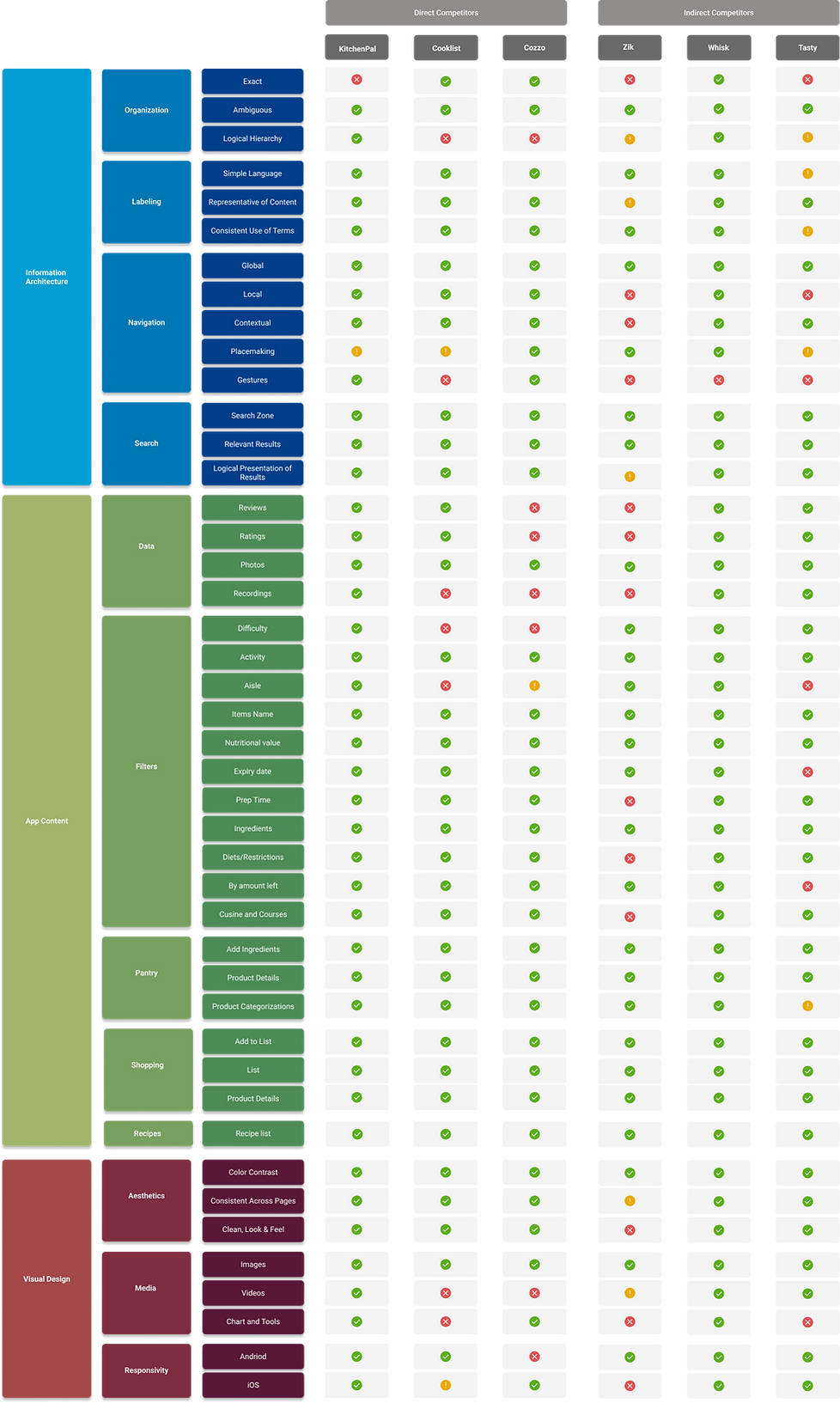
Competitive Audit
2.2 Concept Model
From the competitive analysis, we discerned the three pillars of the ecosystem. This was followed by exercises to figure out and establish the relationships between the three, and to define their content. As a smartphone application, we needed to rely on alternate methods to define the interrelationships among diverse sections to serve as the web equivalent of a sitemap. The concept model was identified as an ideal substitute to define these interrelationships.

Recipe
This section features ‘recipes’ that are tagged based on cuisine, diet type, ingredients, quantities, difficulty level, time to cook, etc

Pantry
This section features ‘products’ that are tagged based on categories that helps identify with recipe ingredients

Shopping
This section features ‘products’, similar to the pantry section. However, the organization will be based on aisles and will feature more options
Starting with a whiteboard exercise, we went through multiple iterations that helped us understand how the various section of the application interacts with one another to form seamless connections to maximize user satisfaction.
As a diagrammatic representation of the key interactions and flows in the kitchen ecosystem, the concept model charts interrelations between various content types and processes.
Thus we arrived at the final concept model with components and sub-components charted out and their interrelationships defined, that was ready to be transformed into a wireframe in the design phase.
.png)
2.3 Content Inventory
Developing a content inventory helped define the overall scope of the project by means of listing out every feature/offering that would appear in the depths of the product. The Content Inventory consists of all information, meta elements, and a categorized list of contents in the application falling under recipe, pantry, shopping, and user profile sections.
Pantry Inventory
Metadata: Name, quantity, dates, nutritional info, brand, barcode, etc
Shopping cart
Metadata: Name, quantity, dates, nutritional info, brand, barcode, etc
Recipe list
Metadata: Name, ingredients, cuisine, time to cook, difficulty level, etc

2.4 Information Objects & Controlled Vocabulary
The development of competitive analysis and content inventory helped us understand the ecosystem we are creating in terms of information objects, metadata, and controlled vocabulary. We identified the user tasks in terms of the interrelationships between the atomic objects such as pantry objects and objects, where multiple pantry objects combine to form a single recipe object, while at the same time these pantry objects combine with several other pantry objects to form other recipes.
The role of controlled vocabulary in the smooth undertaking of user tasks was also identified. To link the diverse pantry objects to a recipe, we realized that there is a need for a uniform vocabulary. For example, the name ‘Vitamin D Whole Milk- 1 gal- Good & Gather’, in the pantry may not be identified as ‘1 cup milk’ that is required to prepare a raspberry swirl ice cream. Therefore, a controlled vocabulary that identifies both objects as ‘milk’ is needed to bridge this gap. This is illustrated in the figure below.


03. Ideation & Design
With a firm grasp of the user, content, and context, we could now move on to ideating and designing the user experience. We chose to begin this by going back to our research to develop more artifacts; affinity mapping and user journey mapping, that could directly inform design directions.
3.1 Affinity Mapping
Although we had synthesized and clustered the data points from user interviews previously, we chose to cluster them further at a higher level, consisting of the three major sections that we have identified during information research. A key takeaway from this exercise was that we were able to identify a fourth section of importance to users; learning, that we further integrated into the design.

3.2 User Journey Map
Based on our understanding of the direct competitors, we went to develop two user journey maps for the two personas we identified. While our analysis earlier was from a content perspective, this helped us have a peek at the products from a user perspective. This helped us to identify the limitations of existing apps that appeared as opportunities in our design project.
.png)
.png)
3.3 Sketching
At this stage we took to hands-on designing, beginning with sketching initial layouts for the critical screens as shown below. These basic sketches were later converted to paper wireframes and further to digital wireframes.


3.4 Wireframing
Building on our understanding of the product from the concept model, we converted the sketches into digital wireframes. Although low-fidelity, these wireframes contained all components critical to carrying out the key user tasks in the ecosystem. A sample of our digital wireframes can be seen below.
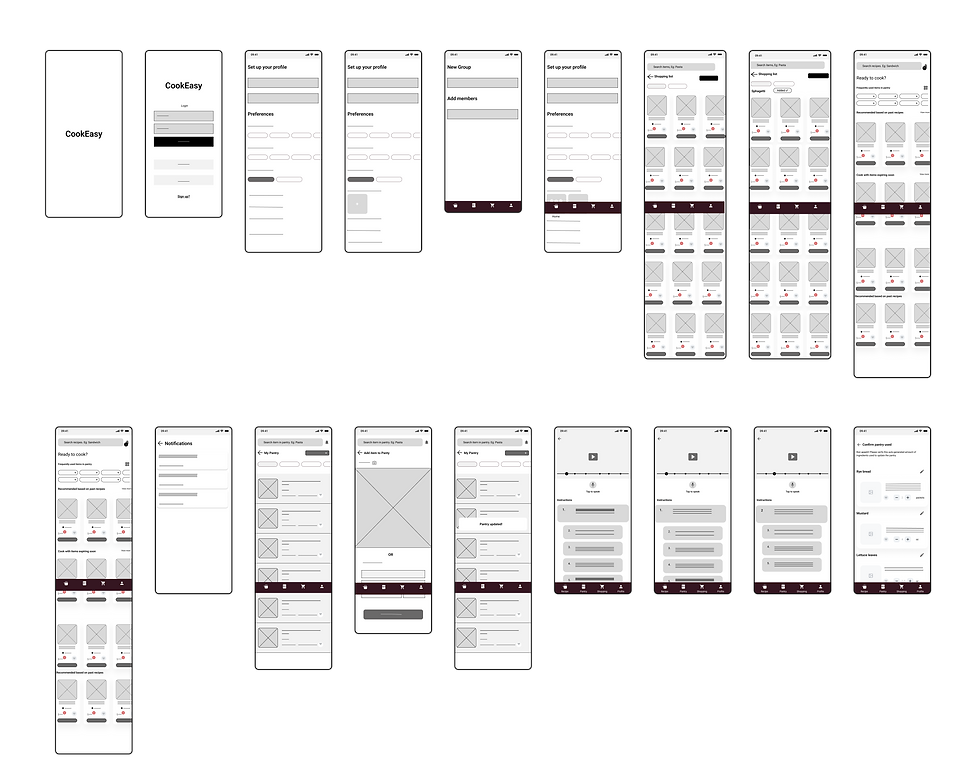.png)
04. Prototyping
Factoring in the complexity of the product and the presence of diverse tasks, we were keen on user testing to see if our concept model was right. Hence we took to low-fidelity prototyping using our digital wireframes and conducted usability tests with 8 diverse participants. We took the feedback and realized issues and further modified the design to develop a mid-fidelity prototype. After testing it further and achieving desirable results we worked on a high-fidelity prototype.
4.1 Low-fidelity Prototyping
We identified 8 key user tasks to guide our design of the prototype.

4.2 Pilot Test & Cognitive Walkthrough
We chose to conduct a cognitive walkthrough with our low-fidelity prototypes as it is easiest to accomodate changes at this stage. We conducted usability inspections based how easily the users were able to carry out the 8 user tasks that we designed for.
The following were some of the insights we received based the results from cognitive walkthrough:
-
Split up onboarding screens to reduce cognitive load
-
Modify the ingredients list to identify from a controlled vocabulary
-
Increase font sizes for better readability
-
Change the units of the used pantry from lbs/oz to slices/bowls/tablespoons (user language)
-
Add speaking instructions before tapping to avoid ambiguity
-
Add descriptions to improve understanding of functionalities (missing pantry, add ingredients to filter recipes)
-
Add highlights on the icon representing the current tab to improve navigation
-
Add more icons on the recipe and shopping page for a better understanding
-
Highlight current instruction on the tutorial page to improve focus
4.3 Mid-fidelity Prototyping
We aimed to solve the 9 key issues that were identified from the cognitive walkthrough were solved in the next iteration. We also added more screens, features, and elements and modified a few to improve the usability of the app.
We reassigned the interactions and modified user flows to better match the users’ mental model. We also added a fresh set of features that the users were expecting to find on the screen. With these modifications, we arrived at a medium-fidelity prototype that we tested informally with prospective users to see if our modifications have actually improved the user’s understanding of the ecosystem and ability to undertake key user tasks.

4.4 High-fidelity Mockups
Major feedback on the mid-fidelity screens was that since the layouts were information-heavy, a mock-up with images and colours might actually help in getting a better idea of users’ understanding of the ecosystem. For that reason, we decided to develop high-fidelity prototypes, where the core of the product remained the same, but the visual design and animations were given more focus on. We conducted a pilot test following the preparation of high-fi prototypes and we observed considerable improvements on time-on-task as the user spent lesser time figuring out the next step.

4.5 Clickable Prototype
This is a clickable prototype. You can set up and customize the app ecosystem, add roommates or family members, filter and choose recipes based on preferred ingredients, add missing ingredients to the shopping list, add items to the pantry using image recognition or manual entry, use real-time video and text-based cooking guidance, activate optional voice controls, and verify the amount of each pantry item used.

4.6 Future Scope
-
Subscription feature for auto updation of pantry and shopping based on liked or predecided recipes for a week.
-
More options in terms of online stores for purchasing groceries with a built-in utility for comparison of prices of similar products.
-
A way to track grocery expenses and add budgeting since affordability is a major concern for many users.
-
Integrate a method to donate expiring groceries to the needy through voluntary organizations
05. Learnings
Through this course and project I learned:
-
a different design approach where we begin by understanding the nature of the content and its interrelationships.
-
how controlled vocabulary plays an integral part in forming relationships between diverse areas of an app ecosystem
-
how information objects play a crucial role in determining the sequence and hierarchy of flow and the overall scope of the project. (Object-oriented design)
-
how putting emphasis on organization, navigation, labeling, and search can impact and improve the overall user experience.