


IKEA Sustainability
UX Case Study: a digital refurbished marketplace that fits into IKEA’s existing framework to offer sustainable and affordable furniture options to reduce furniture wastage
Role: UX Design & Research
Teammates: Calvin Leung, Krish Pabani, Shubh Patel
Project Duration: August 2022 to December 2022
Developed for MSIS course in Human-Computer Interaction
01. The Opportunity
Furniture dump is a growing cause of concern globally. Through this project, we aim to convert this issue into an opportunity.
Americans dump 12 million tons of furniture annually.
Making & shipping a piece of furniture emits 90 kilograms of carbon, equal to flying a Boeing 747 for an hour.
- Fast Company Report


"Used furniture in 2017 amounted to just 2% of total furniture sales (used and new)."
- marketresearch.com
02. The Proposal
The proposal includes feature add-ons to the existing IKEA ecosystem to cater to shoppers occupying temporary housing (e.g. students) for a limited time period.
Within a new “Sustainability” section, not found in IKEA.com/us/en at present, we propose to introduce an IKEA marketplace for refurbished furniture that can address user concerns over traditionally used marketplaces (real-world and digital).


In addition to boosting the affordable furniture industry, the initiative helps reduce the industry's ecological footprint.

2.1 Summary
The IKEA app will be redesigned to introduce affordable, student-friendly features that also offer sustainable alternatives. The goal is to promote the reuse of furniture, improve on existing methods of furniture procurement, with an overarching goal of reducing furniture wastage due to disposal, which has seen a staggering rise over the last decade. The focus is on the tenants, especially students, as they typically relocate within a few months or years, and are burdened with the responsibility to buy and sell/give away/dispose furniture within a short span of time.
By integrating with the existing IKEA platform, that promotes reuse and rental through newly added offerings such as Circular Hub and third-party websites, respectively, we plan to build the missing link in the user flow to ensure a seamless experience for the user. It saves the user the endless time and hassle spent in finding prospective buyers for their used furniture, thus encouraging them to sell off their furniture for refurbishment/recycling in the used furniture market.
03. Usage Research
An important lesson we learned during the course of this project was the distinction between user research and usage research. The goal is not to understand the user, but to understand the work activity in the ecosystem. We interviewed 12 participants, whose responses and pain points were gathered as data notes and sorted/clustered under high-level trends observed in comments using a Work Activity Affinity Diagram (WAAD). We developed two user personas representing two major user classes before proceeding to data modeling.
3.1 User Interview
To prepare for generative user interviews, the team wrote a series of research questions investigating how people purchase furniture (new and used), their thoughts on their purchases, and thoughts on furniture shopping platforms (e.g. online marketplaces, IKEA, social media, etc.). Afterward, the team paired research questions with written verbatims that would be recited to interview participants. The team then wrote a moderator script, structured high-level as such:
1. Welcome
2. Background questions
3. Focus questions
a. Furniture shopping in general
b. Furniture shopping in IKEA
c. Shopping used furniture
4. Retrospective
5. Wrap Up
The team interviewed X participants in total. To be a part of user interviews, participants had to fulfill the following screening criteria:
-
Have you relocated within the past year?
-
Have you purchased furniture within the past year?
People we shortlisted who answered 'no' were exited and did not participate in our generative interviews.

3.2 Work Activity Affinity Diagram (WAAD)
We collectively used various methods to get the raw data. During generative user interviews, moderators wrote notes in real-time (verbatim and condensed) onto a note-taking excel template.
This really assisted in the building of the WAAD diagram.
Link to excel note taking template: here

.png)


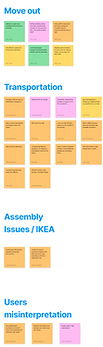
The verbatim responses of the 12 participants from the Excel file were processed to create useful data notes addressing pain points and user behavior as shown below.
The data points were further clustered into sections corresponding to the underlying domains that they addressed. Through this exercise, we were able to identify specific areas where users felt issues with.
-
Raw Data #1: “Finding what I wanted. I want a big mirror but it's kind of expensive. Cheaper options I have to go in person for. I've been looking at FB marketplace but I haven't found what I wanted.” - P2
Work Activity Note #1: Visiting physical stores have cheaper options.
-
Raw Data #2: “Nothing as much. But choosing the chair seemed a little difficult because there were a lot of options for a chair.” - P4
Work Activity Note #2: A lot of options create difficulty in choosing.
-
Raw Data #3: It matters how it's listed. I won't look at the product if the person doesn't have a couple of reviews. I like a lot of pictures, videos, and descriptions. A few pictures = scratches. I like responsive people as well. - P6
Work Activity Note #3: Prospective furniture purchasers experience inconsistent customer journeys in online marketplaces, ......subsequently resulting in trust issues. To ensure product quality, participants want responsive support, reviews, and authentic visuals.
3.3 User Persona
We identified personas on the based-on data we collected through user research. Mostly there are two types of university students “Domestic” and “International” students:
-
Domestic student who recently got rid of his existing furniture is migrating to a new city for graduation after completion of undergrad. And he is planning to buy affordable but high-quality furniture upon arriving in the new city.
-
International student who transited to an unfurnished apartment in a new country. She was looking for cheap but reliable furniture.

Shubhi, the “New International University Student,” is interested in purchasing used furniture for their unfurnished apartment. Having flown in internationally, they need cheap yet durable small and large furniture ASAP.

Charlie, the “New Domestic International Student,” is transitioning from undergrad at Arizona to grad school at Texas. He recently got rid of his existing furniture. Of note, it was a haphazard process since his lease ended immediately after graduation. While he was able to bring in small furniture using his car, Charlie is planning on buying affordable yet high-quality big furniture upon arriving to Arizona.
04. Requirements & Modeling
The team decided to construct the following data models as they were identified as appropriate for the project: user models (work roles, machine work roles), usage model (flow model), task structure model (hierarchical task inventory), task interaction models (step-by-step task interaction model).
4.1 Hierarchical Task Inventory
The team created a hierarchical task inventory model representing all the tasks an IKEA customer can accomplish within our proposed IKEA used furniture ecosystem:
-
Exchange used IKEA furniture for IKEA credit/ cash (seller)
-
Select furniture model
-
Initial quality check
-
Arrange transport
-
Trade furniture
-
-
Select refurbished furniture for purchase (buyer)
-
Find refurbished furniture
-
Checkout— enter payment
-
Claim furniture
-
Furniture transported to home (either from warehouse or delivery)
-
.png)
4.2 Flow Model
.png)
Flow Models were created to illustrate the working relationship between machines (database and IKEA website) and users (IKEA buyers/ sellers, IKEA transport, and IKEA used furniture inspectors.
One potential barrier to the flow model is furniture being damaged in transit, preventing used furniture transactions from being complete.
4.3 Task Interaction Models
We leveraged task sequencing models to illustrate different critical usage case scenarios in the workflow of the app.
4.3.1 Step-by-step Task Sequencing Model
.png)
Adding refurbished furniture to cart
Submit Request for selling used IKEA furniture
Confirming sale offer from IKEA
4.3.2 User Scenario Model
Charlie is a software engineer moving out of the city in a week. They want to sell their IKEA furniture as soon as possible, but also want to ensure they get a fair price for them. They tried posting advertisements on social media apps but got a minimal response as there was less local demand at that time of the year. He knows people at his workplace who had faced similar issues in the past, and ultimately had to dump the furniture in the backyard or give them away for free. Charlie is desperate about the situation. He comes across the IKEA Sustainability feature on the IKEA app, where he could return his furniture for cash or store credit. Time is not a constraint anymore as they can instantly upload details of the products through the app, which will be remotely inspected by store personnel. He is relieved that he could sell his furniture, arrange transport and get credit, all through the app.
Rhea is a student who moved to the US recently. She wants to set up her home and is looking for cheap and durable options. She explored used furniture on marketplace apps, but they wouldn’t arrange transport. She is also cautious about visiting strangers to
inspect their furniture and also knows that they often increase the prices from what’s listed on the apps. She struggles to ensure quality and find affordable furniture. Having discovered the IKEA Sustainability feature, she could now get durable and
certified IKEA furniture for a cheaper price than a new one. Furthermore, the Sustainability feature had a special student’s section, that gives her access to student bundles, create checklists and buy the required products based on her requirements/ living conditions. She doesn’t have to worry about transport as IKEA arranges transport as well.
Sal is a sustainability enthusiast who needs to buy a new couch in place of his old IKEA one. He doesn’t want to buy new furniture as he cares about its environmental consequences, as furniture dumping is a major crisis in the US. At the same, he wishes to ensure the durability and quality of the product. He wishes there was a more mainstream way to buy used furniture other than dealing with present owners, just like buying refurbished digital devices through online markets. On encountering IKEA Sustainability, he was relieved as it was exactly what he needed. As the furniture is sold by a trusted retailer, he doesn’t need to take up the responsibility of ensuring quality. Furthermore, he can sell back his existing furniture to IKEA, thus ensuring his furniture won’t go to the dump while also getting a decent discount on his new purchase.
05. Ideation & Design
5.1 Storyboarding
The team then went to a whiteboard and drew two storyboards outlining needs and subtasks with 1) students exchanging used IKEA furniture back to IKEA for in-store credit, and 2) students purchasing used IKEA furniture. The first 3-4 panels highlight student needs and pain points (e.g., purchasing friction in online marketplaces, leaving furniture in the streets when abruptly moving out, students being low-income coming straight out of high school/ undergraduate school, etc.). The following whiteboard pictures illustrate the benefits of IKEA Sustainability.
Scenario 1: Exchanging used IKEA furniture for store credit
Scenario 2: Student purchasing used IKEA furniture


5.2 Sketching & Wireframing
Following storyboarding, the team took to the whiteboard to plan user flows, key tasks, and screen layouts. This was an iterative process that went on for hours. On deciding the overall user flow, we split the key user tasks among the team members to sketch individual flows. By sketching paper prototypes we conceptualized our user activities, interactions, and features to fit the needs of the app and the ecosystem.


Inspecting used furniture on IKEA Sustainability
-min%20(1)%20(1).png)
-min%20(1)%20(1).png)
-min%20(1)%20(1).png)
-min%20(1)%20(1).png)
Onboarding, student verification and student home.
06. Prototype & Pilot Test
After evaluating our flow diagrams and sketches, the team opted to narrow our scope by designing tasks that involve consumers buying/ selling used IKEA furniture under a new IKEA sustainability campaign:
-
Customers going to the IKEA sustainability page and adding refurbished furniture to checkout
-
Customers logging into IKEA for students and interacting with feature (e.g. furniture bundle checklist)
-
Customers selling used furniture
-
Customers finding used furniture based on location
The team opted to stick to flows involving customers buying/ selling used furniture under our proposed IKEA sustainability campaign. Evaluating our existing flow diagrams/ brainstorming, the team opted to not design screens that involve IKEA inspectors or other IKEA employees (which was the entire 2nd half of our hierarchical task diagram).
6.1 Low-fidelity Prototyping

The wireframes demonstrate users’ happy paths in purchasing used IKEA products. To navigate to student-minded furniture pages, they must select a student banner and authenticate themselves by entering their .edu email. An additional feature is a checklist, which helps students keep track of what they need to buy, like in a physical scenario, with the app returning options for each selected product.
The wireframes demonstrate users’ happy path exchanging used furniture for IKEA in-store credit. The sell button is featured on the landing page. For selecting the model, they go through curated steps that make model identification easier. Following the identification, they are expected to rate the condition of the furniture and report damages. The damage reports are sent to the inspector and the app returns a quote after an agent inspects the photos, which is notified to the user as a pop-up. The user can then accept or reject the offer.
6.2 Mid-fidelity Prototyping
Customers are introduced to the splash screen before viewing the IKEA home page. They will also have clickable access to the IKEA search page and all campaign sliders. From all three screens, customers can access the IKEA sustainability campaign via campaign cards or links.
Once the user has selected the products they are redirected to the checkout page where they will be summarised how many products they have bought and provided with the options to increase or decrease the quantity of the selected products and asked to choose between delivery or self-pickup options or delivery address followed by selecting the desired payment method.
Students are asked to log in and verify their university details by entering their university e-mail to avail of student benefits and offers.
Users are provided options of curated furniture bundles in order to save time and effort to search elsewhere with the added flexibility of being able to add or remove some items based on preference. The checklist option would allow users to select their required items and the app will curate a bundle for the respective user.
Users are provided with the option to sell their existing IKEA products back to the provider. The task includes selecting the model that the user wishes to sell (which can be done in two ways; through a series of choices to narrow down to the furniture, or by entering the product name), reporting damages with photographs, and submitting the report for evaluation by IKEA. The next stage of the process is initiated when IKEA offers a price following which the user may choose to accept or reject the offer. If the user choose to accept the offer, this is followed by choosing the payment and delivery methods for the return.

6.3 Pilot Test
The team recruited one participant for the pilot test after passing them through several screening questions:
-
Are you a former IKEA shopper?
-
Yes = Pass
-
No = Exit
-
-
Are you currently a university student?
-
Yes = Pass
-
No = Exit
-
-
Have you used the IKEA app within the past six months?
-
Yes = Pass
-
No = Exit
-
-
Have you bought used furniture within six months?
-
Yes = Pass
-
No = Exit
-
After passing our participants through the screener, the team then conducted one moderated usability test through the following format.
Focus Questions - Generative Tasks
-
Think out aloud what you see on the screens.
-
What do you expect to see on the IKEA Sustainability page? (Before opening the page)
-
What do you think the IKEA Sustainability page offers? (After opening the page)
-
What do you expect to see when you click on student offers?
-
What do you expect to happen after preparing a checklist of items?
-
What do you expect to happen after you successfully place a sell request?
Focus Questions - Evaluative Tasks
-
Navigate the refurbished marketplace from the homepage.
-
Select a store to search for refurbished goods.
-
Access the student store within the refurbished marketplace.
-
Authenticate your student status.
-
Make a checklist of items to be bought on the students’ page.
-
Place a sell request for your IKEA table.
-
Accept the offer from IKEA and schedule pickup for your used product.
Retrospective
-
Is there anything about the low-fidelity screens I shared you think I should know more about?
-
Can you share with me three of the most memorable things you found on the screens I shared today?
-
Can you share with me three of the most frustrating things you found in the screens I shared today?
6.4 High-fidelity Mockups
The mid-fidelity prototypes were converted to high-fidelity by introducing a design system and interactions. The design system is highly influenced by the existing system of the IKEA app since the designed elements are housed within the existing app ecosystem.


6.5 Clickable Prototype
The clickable prototype featured here allows users to perform the designed tasks and user flows.
The prototype begins at the existing home page of the IKEA app, which features a banner for the 'Sustainability' campaign. The campaign can also be found at other locations within the app.
Given below is a list of user tasks:
-
Accessing the IKEA sustainability marketplace.
-
Find a nearby IKEA store and add a refurbished product to your cart.
-
Sell a used IKEA desk and submit it for IKEA inspection. Now there will be a notification for a request you submitted, please accept the offer.
-
Log into an IKEA as a student and select a bundle, remove one item from it and add to the cart.
-
Create a checklist of furniture you want to buy.

07. Learnings
-
Introducing feature add-ons to an existing ecosystem by aligning elements to the existing hierarchy and user flow.
-
Generative research involves not making any assumptions— what’s most insightful may end up being the most surprising.
-
Creating alignment involves listening, consistency, setting healthy boundaries, and having fun during meetings.
-
The importance of data modeling in the design process to bridge the gap between user research and ideation.